Note: This article is available in Chinese only. 本文暂无英文版本。
View original
我的chromebook 是 samsung 3
查阅Hardware Compatibility 可以知道我的cb支持 gallium,对应的cpu 是Intel Braswell
然后去galliumos 官网 下载相应版本。 (发现这种做法并不需要自己下载。。。)
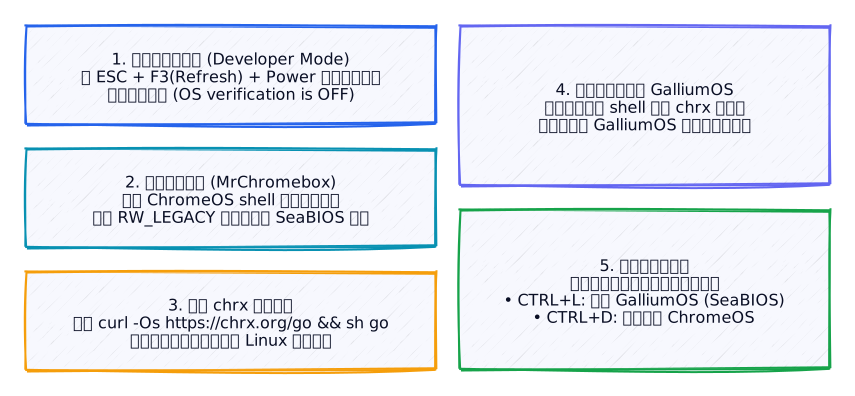
安装 galliumOS大体有两种方法,一种是完全去掉chromeOS,这种方法需要拆机去除写保护。。。我嫌麻烦。。。于是打算另一种,使用chrx
步骤如下:
- Enable Developer Mode (process is model-specific; for Acer C720, press
ESC+F3(Refresh)+Power), then reboot- Load ChromeOS by pressing
CTRL+Dat the white “OS verification is OFF” screen- Configure your Wi-Fi network if necessary, then log in (Guest account is fine)
- Open the ChromeOS Terminal by pressing
CTRL+ALT+T, and entershellat the prompt- Update firmware, if necessary (required for Bay Trail and Braswell models, recommended for Broadwell and Skylake models, optional for Haswell models – see chromebooks)
- Run chrx:
cd ; curl -Os https://chrx.org/go && sh go(see options)- Follow on-screen instructions to prepare your Chromebook for installation
- Reboot, then repeat steps 2-4 and 6 to install and configure your new system
对于braswell model,必须要刷一个固件才可以:mrchromebox
刷好之后按照步骤安装。。。
安装成功以后。。。
做了以下事情:
  * 安装搜狗输入法
  * 安装中文字体
  * 安装vim
  * 安装fish
  * 安装shadowsocks
  * 安装guake
  * 登录chromium 同步各种插件
  * 安装aria2
  * 安装franz
  * 安装ssh
  * 安装variety
  * 使用xmodmap,将搜索键映射到win,映射了几个不用的功能键(到f1,f3 Page_Down,Page_Up)
补一个xmodmap的配置文件。
1keycode 133 = Super_L
2keycode 72  = Page_Up
3keycode 73  = Page_Down